Your feed shows only a fraction
The algorithm picks a small slice of what your network publishes. What you don't see, you'll never know you missed.
Sales prospecting, brand monitoring, market watch, recruiting, job hunting: you say what you're watching. The extension reads your feed and queries LinkedIn search in the background, then sends you the person and a direct link to their post.
30-day free trial, then €6.99 a month or €69 a year.
The algorithm picks a small slice of what your network publishes. What you don't see, you'll never know you missed.
A job opening posted as an update, a request for a contractor, a funding announcement, a review of your product: the useful window is short. By the next day, only the comments are left.
Typing the same queries three times a day, sorting through the noise, remembering what you've already seen. Nobody keeps that up for long.
A guided setup in three questions takes you from install to first alert. No technical knowledge required.
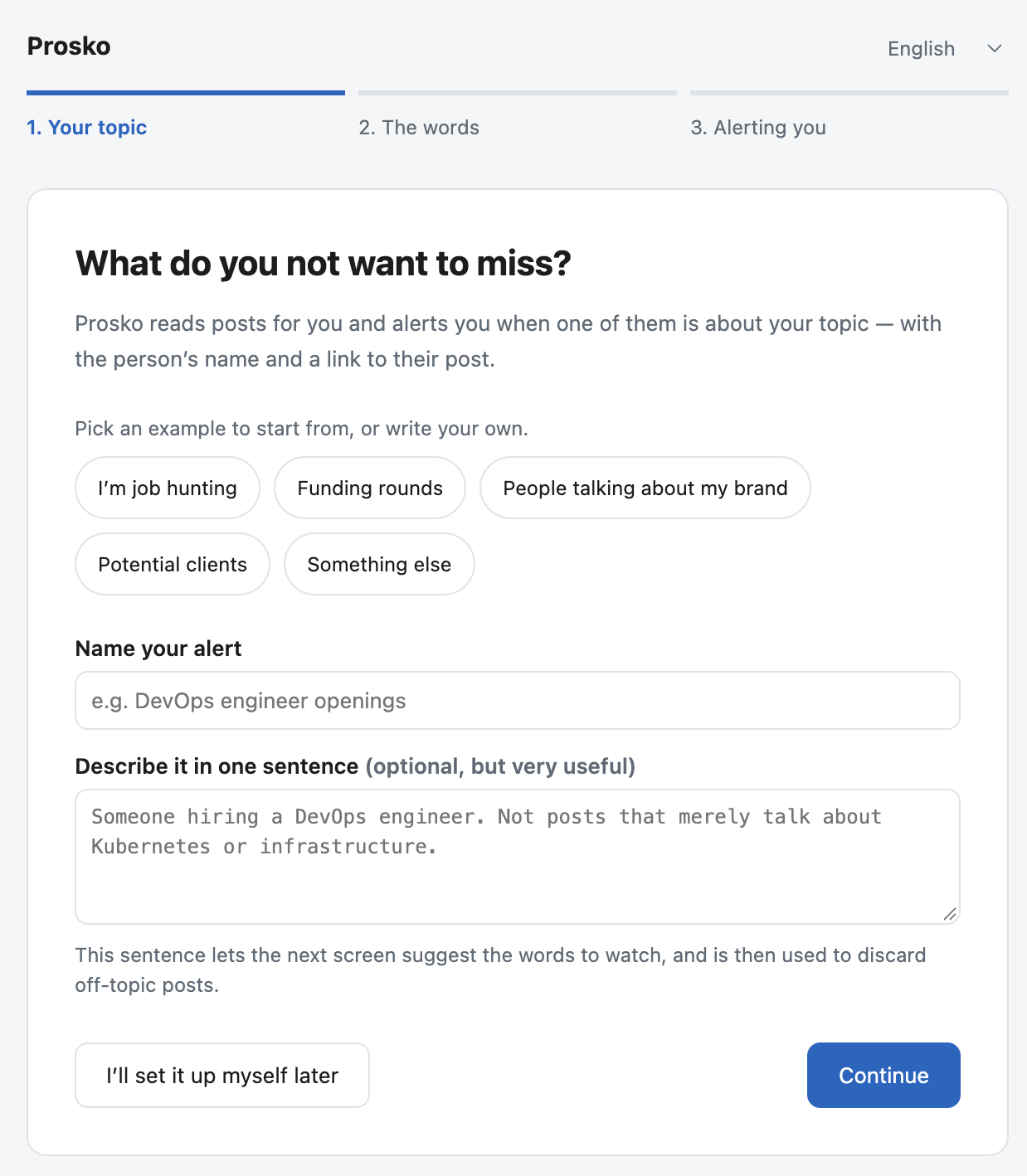
A topic, the words that should trigger an alert, the words to ignore. Ready-made examples fill it all in with one click.
It reads the feed while you browse, and queries LinkedIn search in the background — that's what reaches beyond your own network.
Every find lands in the extension — and in Slack or Discord if you want. One click and you're on the post.
The extension doesn't know your line of work: it watches the words you give it. Here is what people do with it. The examples below are illustrative — neither the people nor the posts are real.
Salespeople, freelancers, agencies. Requests for contractors get posted before they turn into formal tenders. Being the first to answer changes everything.
“Does anyone know a solid agency to rebuild our website? Budget is approved, we'd start in March.”
Founders, comms teams, support. Know when someone talks about your brand, your product or your competitors — the day it is published, not three weeks later.
“Six months using Nivelo day in, day out. Honestly, our verdict is more mixed than what you read everywhere.”
Candidates, and anyone keeping an eye out. Plenty of openings never become a job ad: they live in a post, for a few hours.
“We're hiring for a role that isn't online yet. Permanent, Lyon or remote — DMs open.”
Founders, investors, business development. Funding rounds, new offices, arrivals and departures: the signals that announce a need, before it becomes a tender.
“Proud to announce that we have just raised €3M to accelerate in the French market.”
Recruiters, researchers, journalists, nonprofits: the logic stays the same.
A topic, the words that trigger it, the words to ignore.
No automatic summary, no opaque score. The person, what they do, what they wrote, and the link to the post.
“The start of the post, then the sentence where your watched word appears, kept in context so you can tell in a second whether it concerns you.”
Anatomy of an alert. The content depends entirely on the words you watch.
A keyword cannot tell the difference between someone who is genuinely looking for what you watch and someone who is merely talking about it: a job offer and an opinion piece contain the same words. You describe your intent in one sentence, the assistant re-reads the posts your words kept and discards those that do not match.
Three notifications for nothing. After a week, you stop opening them.
The assistant works on the posts your words already kept — not on all of LinkedIn. That is what keeps the cost negligible.
The analysis is covered by the subscription, within a monthly volume. Nothing to configure, no key to create: the assistant works from your very first alert.
The extension always shows what you have left and when it resets. Once the quota is reached, monitoring carries on with keywords alone: it never stops.
If the quota is not enough, enter your Claude or ChatGPT key in the settings: no limit at all from us, and you are billed directly by the provider.
“I ran searches and nothing came back” is not a question about how it works, but about the step where it stopped. The activity log counts every step and names the cause, in plain words.
LinkedIn changes its interface regularly. The extension watches its own failure rate and warns you when it loses track, instead of staying silent.
6 posts read, 3 matches, 2 discarded by the assistant — 1 alert sent.
Everything runs in your browser. Your keywords, your finds and your keys never leave your machine. Nothing is sent to us — we have nothing to send.
On install, the extension does not open a settings page: it asks three questions, with clickable examples that fill everything in.
The AI assistant works from your first alert, with no key and no configuration.
The price covers the extension and the AI analysis, within a monthly quota shown at all times in the extension. Beyond it, keyword monitoring carries on, and you can use your own key to analyse without limits — you are then billed directly by your provider.
We host nothing: the subscription does not pay for servers, it pays for upkeep. LinkedIn changes its interface several times a year, and every change breaks the reading of posts until the extension is updated. That is the work that never stops, and that is what you are funding.
No commitment, cancel at any time.That is €5.75 a month: two months free.
No account to create with us.
30-day free trial, no credit card required, then €6.99 a month or €69 a year.
No. AI analysis is included in the subscription, within a monthly volume the extension shows at all times. Beyond it, keyword monitoring carries on as usual. If that quota is not enough, you can enter your own Claude or ChatGPT key: there is then no limit at all from us, and you are billed directly by the provider.
Nothing. There is no server, no account, no telemetry. Your keywords, your finds, your AI key and your webhook address stay in your browser's local storage. The only possible outside destinations are the ones you configure yourself: your Slack, your Discord, your AI provider.
Not yet. Prosko is currently a Chrome extension (version 116 or newer), which also runs on Chromium-based browsers — Edge, Brave, Arc, Vivaldi — without us testing them all. Firefox and Safari are not supported for now.
One licence covers one person, on as many machines as they use — up to three. The monthly analysis quota is shared between them: it is one quota per subscription, not per computer. Technically, each install is independent: settings do not sync from one machine to another. A configuration export lets you copy them across — it always leaves out secrets, which therefore have to be entered again on each machine.
Yes. It is an extension, not a hosted service: if your machine is off or Chrome is closed, nothing scans. That is the direct trade-off for nothing running on our servers — and what keeps your LinkedIn session out of third-party infrastructure.
No, and nobody can. LinkedIn returns only a handful of results per search, and its feed shows only a fraction of what your network publishes. Coverage comes from repetition: the extension goes back over your terms regularly. It is far more than you would see by hand, and it is not exhaustive.
You can cancel the subscription at any time: from the customer portal linked in your purchase email, or by writing to contact@prosko.app, with no notice period. It then runs until its expiry date, with no renewal.
Scans stop at the expiry date. Either way, uninstalling the extension deletes the data it stores on your machine: there is no account to close with us, since there never was one.
Your keywords, your finds, your machine. Nothing else.
Try it freeHello. I answer questions about Prosko: what it does, what it costs, what it does not do. If I do not have the information, I will tell you rather than invent it.
Answers are AI-generated from a product sheet. They are not binding on the publisher.